How to use Tensorboard inline in Jupyter Lab (or Colab)
After many useless searches on the internet and using all the most capable LLMs out there, I couldn’t find the solution to the problem in the title.
First let me describe the problem: When you use tensorboard within a jupyter-like environment you get an inline tensorboard frontend. But when you host your jupyter behind a reverse proxy the tensorboard frontend running at http://behind-the-proxy-jupyter-url-but-on-port:6006 suddenly is not accessible anymore and you get this sad document icon instead.

After you expose it on a separate URL through the reverse proxy, you observe the Jupyter still tries to load it from your internal URL and that the tensorboard command has no argument for the URL.
The solution can be found in the tensorboard code:
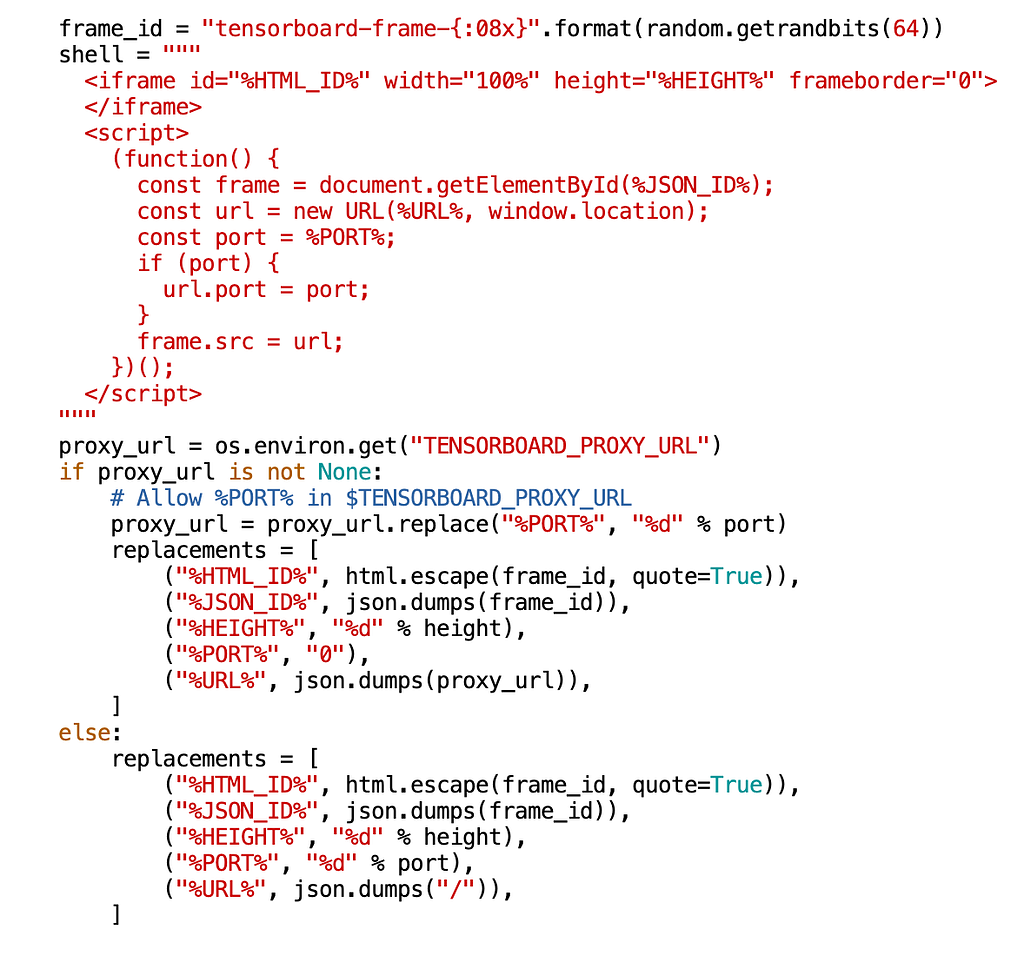
So the solution is now simple:
import os
os.environ["TENSORBOARD_PROXY_URL"] = "https://tb.exampleproxy.com"
And then run the tensorboard command.
I hope search engines index this so other people don’t need to go digging in the sources for such a simple problem.
Bonus knowledge:
If you can’t start Tensorboard anymore because of some reused process that doesn’t actually exist, you can do this on Linux to start clean:
rm -rf /tmp/.tensorboard-*
or this on Windows:
del /q /s "%USERPROFILE%\AppData\Local\Temp\.tensorboard-*"
Originally published on Medium, 17 March 2024. Original.